Roles
Roles' purpose is to associate users with some permissions in the apps. Users are assigned some roles. And the apps are configured to grant users some permissions based on those roles.
At the core, a role is just a label, stored in the LDAP registry. A role gets useful when an application aknowledges its existence and configures some logic based on the user's belonging or not to that role.
Example: if you assign the ADMINISTRATOR and the GN_EDITOR to a user, this one will granted
- admin profile on GeoServer
- editor profile on GeoNetwork
Core roles
On a brand new geOrchestra instance, some core roles are defined and are already used by the applications.
The roles:
SUPERUSERgrants access to the console webapp (where one can manage users and roles),ADMINISTRATORis for GeoServer administrators,GN_ADMINis for GeoNetwork administrators,GN_EDITORis for metadata editors,GN_REVIEWERis for metadata reviewers,MAPSTORE_ADMINis for MapStore administrators,REFERENTallows users to edit their own organisation (basic information only),EMAILPROXYallows to use the emailProxy webservice from the console,IMPORTallows users to publish data with the importer application (also called datafeeder),ORGADMINis automatically granted to all users holding an admin delegation,USERis for the basic SDI users.
Other roles can be defined by the platform administrator, using the console (or directly in the LDAP registry).
Roles delegation
TODO
Using additional roles
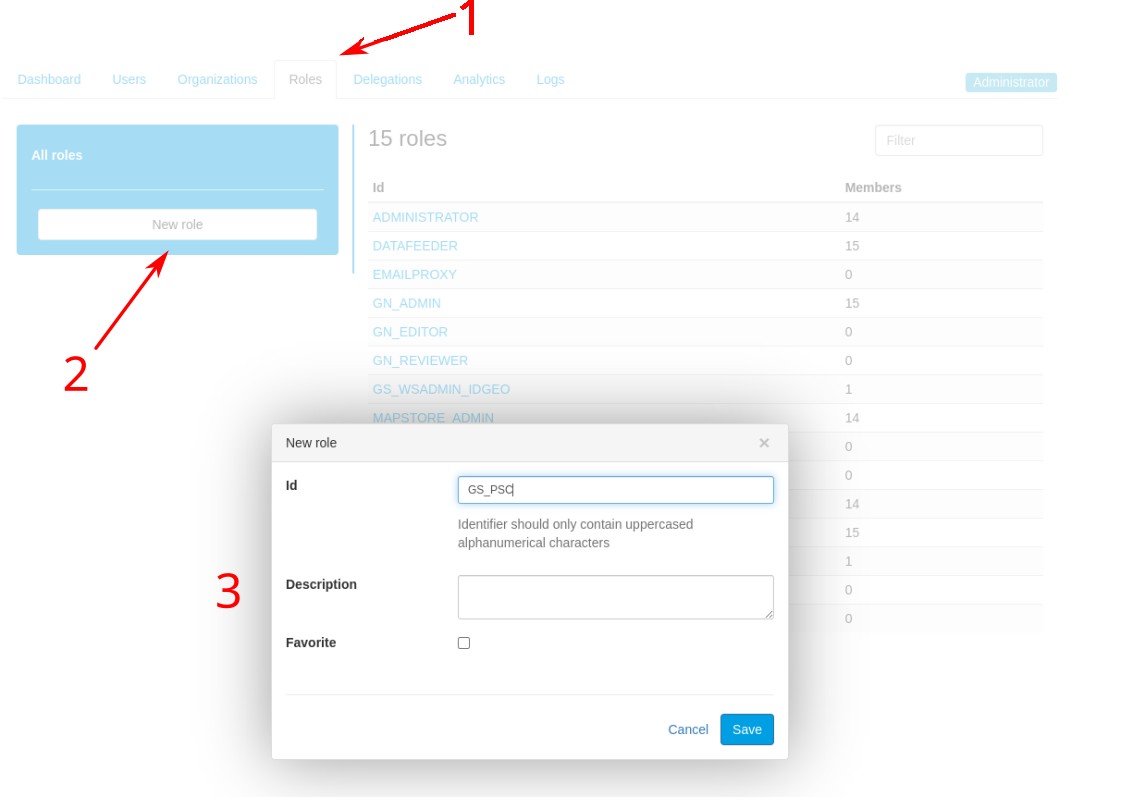
1. Create a new role
A person having the SUPERUSER role has the capacity to create new roles. At this stage, a new role is just a label with a description (optional).
This is done on the console UI, role tab.
2. Assign a new role to a user
Then, it is possible to assign this new role to users. There are 2 ways to do it, on the console interface:
- either on the user's profile, in the
rolestab - or in the console's roles tab: open the new role's configuration interface, in the
userstab, you can select the users.
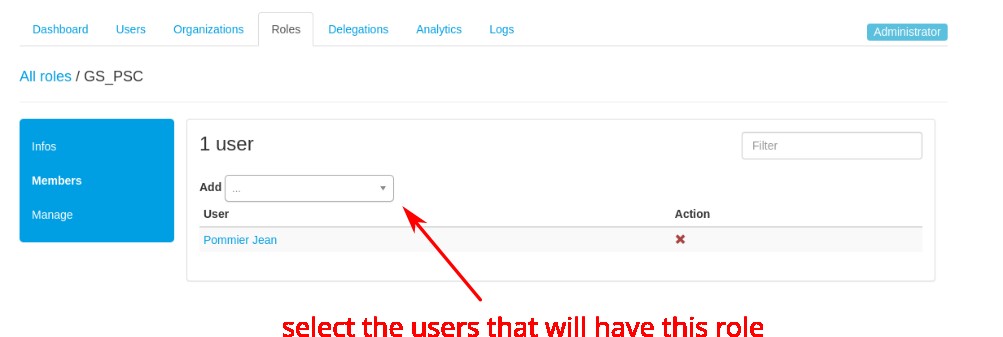
Remark: this second way is more handy when you want to assign the role to several users
3. Configure an application to use a new role
This is on a per-applications basis. Some applications are likely to make use of new roles, others not so much.
On the Rights management section is a list of core applications that can use new roles and how to leverage it.